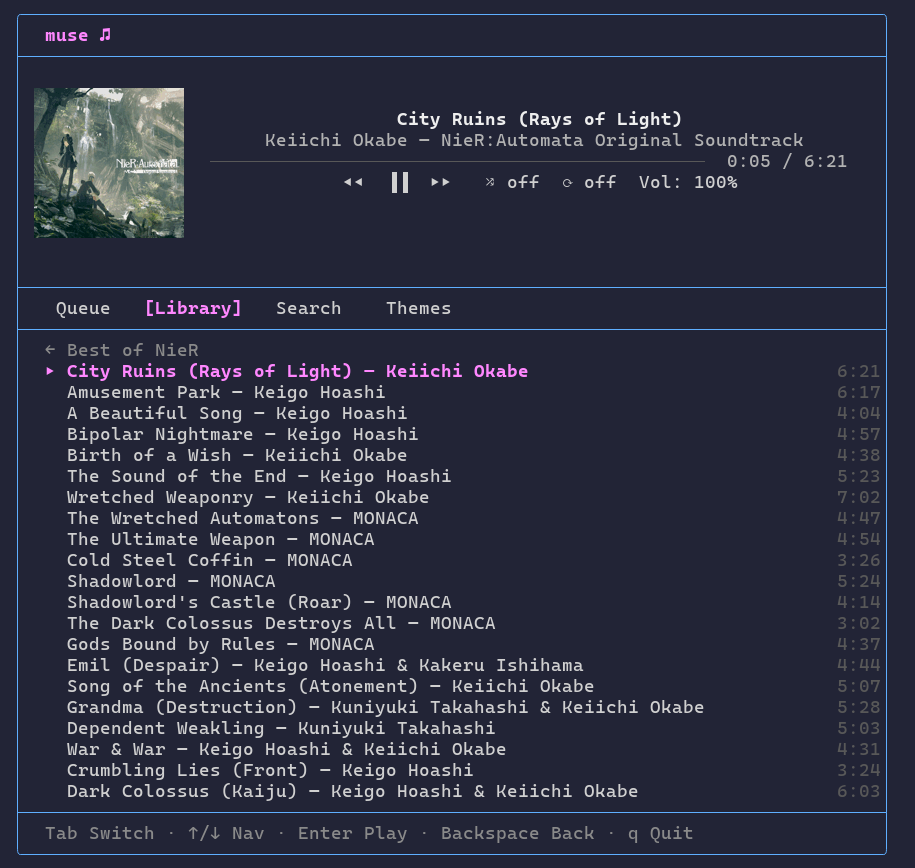
A small terminal app for controlling Apple Music from the command line. Built in Swift with no dependencies — just raw ANSI escape codes and AppleScript talking to Music.app.
The interface is a single unified screen: the now-playing panel sits at the top with track info, a progress bar, and playback controls, while a tabbed panel below lets you switch between your queue, library, search, and themes without ever leaving the player view.
In terminals that support sixel graphics (WezTerm, iTerm2, foot, Ghostty, etc.), album art is displayed alongside the track info in the player panel. Detection is automatic via the DA1 terminal query, with a MUSE_SIXEL environment variable available to force it on or off.
Everything runs through osascript calls to Music.app. A background refresh loop polls the player state every couple seconds so the progress bar stays in sync, and playback commands fire asynchronously so the UI never blocks.
Features
- Queue — shows tracks from the last playlist you played, with auto-advance when a track finishes
- Library — browse playlists, drill into tracks, play from any position
- Search — live filtering across your library (minimum 2 characters)
- Themes — select from built-in color themes
- Album art — sixel graphics in supported terminals, with graceful fallback
- Jump to artist/album — press
aorAto search the current track’s artist or album - Shuffle, repeat, volume controls (letter shortcuts work from Library and Queue tabs)
- Adapts to terminal size
Key bindings
| Key | Action |
|---|---|
Tab / Shift+Tab | Cycle tabs |
l | Library tab |
/ | Search tab |
space | Play / Pause |
n / p | Next / Previous |
+ / - | Volume |
s / r | Shuffle / Repeat |
C | Clear queue |
a / A | Search current artist / album |
Enter | Play track or browse playlist |
↑ / ↓ | Navigate |
Backspace | Back or clear search |
? | Help overlay |
q | Quit |